The shared inbox for your team's DMs
Your company's X account, the founder's LinkedIn and the sales WhatsApp number, in one team inbox. Everyone signs in with their own login, every conversation has an owner, and nobody replies twice. Team features are on Pro.
What is a shared inbox?
A shared inbox lets a team read and answer the messages sent to one account, each person from their own login. Inboxapp is a shared inbox for direct messages on X, LinkedIn and WhatsApp. Teammates work the same accounts without sharing passwords, assign conversations, leave internal notes, and see when a teammate is already replying so two people don't answer the same DM.
Your DMs are a team job. The apps were built for one person.
X, LinkedIn and WhatsApp give each account one login. So teams share a password, pass a phone around, or leave every DM to one person, and leads wait or get two answers.
- No shared passwords. Teammates work each account from their own login.
- One owner per conversation. Everyone can see whose it is.
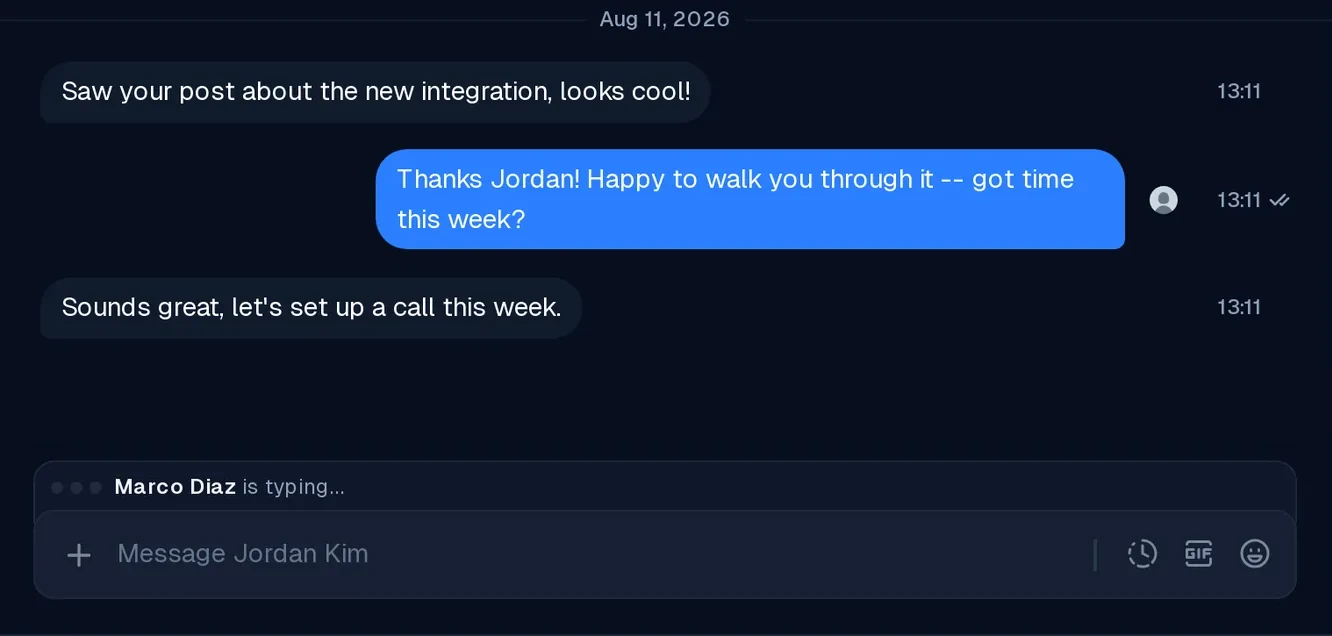
- One reply, not two. Collision detection shows when a teammate is already typing.
Share every account without sharing a password
An admin links each account once: X and LinkedIn through the browser, WhatsApp with a QR code. The whole team then works them from one inbox.
- Many accounts, one inbox (Pro). Same statuses, tags, assignees and views.
- Switch the account you reply from in one keystroke.
- Sent from the real account. The other side sees your X, LinkedIn or WhatsApp account.
- A separate team per client or brand for agencies.
Every conversation has an owner
A DM nobody owns is a DM nobody answers. Press A to assign it, and it shows up in that teammate's view.
- Internal notes your team sees and the contact never does.
- Shared context. Status, tags, notes and owner update for everyone at once.
- Views for each job: assigned to me, no reply, unread, archived, plus views you pin.
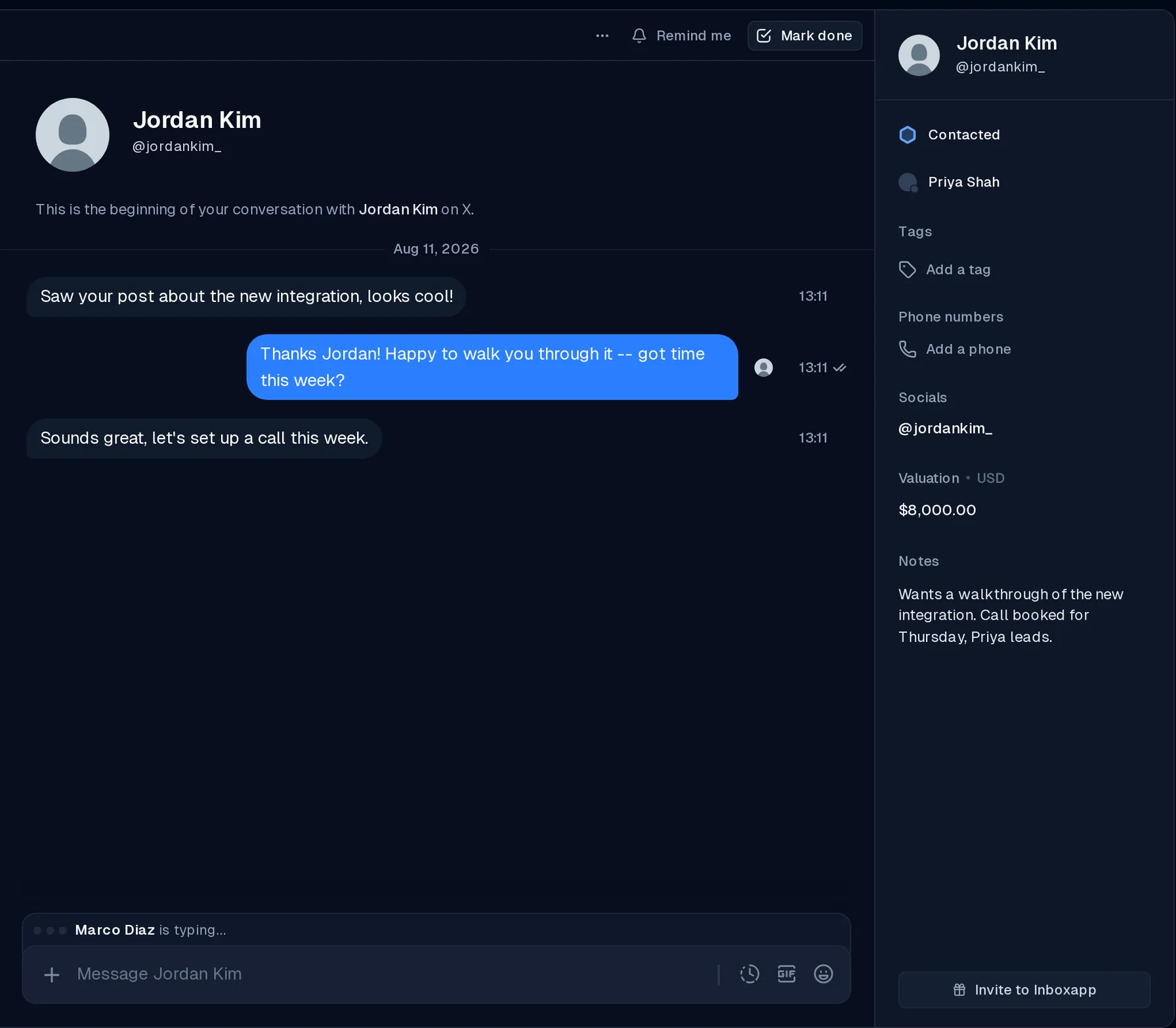
Two people, one DM, one reply
Collision detection shows a notice when a teammate is already typing in a conversation, so the second person moves on and the lead gets one clear answer.
- Replies sent from the X app count too. They're marked read for the whole team. You can turn this off in Settings.
Control who can do what
Give the team access without giving everyone the keys.
- Role-based permissions. Owners, admins and members. Owners and admins link accounts and handle billing.
- Every message is traceable to the teammate who sent it.
- Removing someone is instant. They lose access to your accounts right away.
- Invite by email. Teammates get every account linked to the team.
One pipeline for the whole team
Every contact gets one status, tags and notes, whichever app they message you on. AI can sort new conversations into the right status as they arrive.
See how the Inboxapp CRM worksX, LinkedIn and WhatsApp in one shared inbox
Inboxapp vs Front, Missive and Help Scout
Front, Missive and Help Scout are shared inboxes built around email and customer support. Inboxapp is a shared inbox for the X, LinkedIn and WhatsApp DMs where deals, hires and partnerships start.
| Feature | Inboxapp | Front | Missive | Help Scout |
|---|---|---|---|---|
| How it describes itself | Shared inbox and CRM for DMs | Omnichannel customer service | Collaborative email client built for teams | AI-driven support platform |
| Channels it lists | X, LinkedIn, WhatsApp | Email, voice, chat, SMS, Facebook, Instagram, WhatsApp, Slack and more | Email, SMS, WhatsApp, Instagram, Messenger, live chat | Email, live chat, SMS, Instagram, Messenger, WhatsApp, voice |
| LinkedIn DMs | Yes | Not listed | Not listed | Not listed |
| X DMs | Yes | Not listed | Not listed | Not listed |
| Pipeline and statuses on each contact | Built in | Through CRM integrations | Not listed | Not listed |
Based on each company's own website, checked November 2026.
Frequently asked questions
What is a shared inbox?
A shared inbox lets several people read and answer the messages sent to one account, each from their own login. Inboxapp is a shared inbox for direct messages on X, LinkedIn and WhatsApp, with assignment, internal notes and collision detection.
Can a team share one X, LinkedIn or WhatsApp account?
Yes, on Inboxapp Pro. An admin links the X, LinkedIn or WhatsApp account once, and every teammate works its messages from their own Inboxapp login. Nobody shares the account's password.
How is Inboxapp different from Front or Help Scout?
Front, Missive and Help Scout are shared inboxes built around email and customer support. Inboxapp is a shared inbox for X, LinkedIn and WhatsApp DMs, with a built-in pipeline for the conversations that turn into deals.
Do we need the WhatsApp Business API?
No. Inboxapp connects to the WhatsApp or WhatsApp Business app you already use by scanning a QR code. You don't need Meta approval or message templates, and WhatsApp keeps working on your phone.
How does Inboxapp stop two people replying to the same DM?
Inboxapp's collision detection shows a notice when a teammate is already typing a reply in a conversation, so the second person doesn't reply too. Assigning each conversation to one teammate makes the owner clear.
Will the people we message know a team is replying?
No. Messages are sent from your own X, LinkedIn or WhatsApp account, exactly as if you sent them on the platform. Inboxapp records which teammate sent each message for your team only.
What happens when a teammate leaves?
Remove them from the team and they lose access to your linked accounts right away. Their assigned conversations are unassigned, so you can hand them to someone else.
How do I get started with a shared inbox?
Start a 7-day free trial, connect X, LinkedIn or WhatsApp in a few minutes, and your existing conversations sync in. Team features are on Pro, and plans are on the pricing page.
Bring your team into your DMs
Link your accounts once. Everyone works them from their own login.